本帖最后由 拥有小目标 于 2025-5-20 14:53 编辑
# 上次送1000元券活动是3.11-5.11,错过就错过了
# 这次期限是5.20-6.08 公司或学校名字随便填一个就行
先报名(带AFF):点击报名、公司或学校名字随便填一个就行
https://edu.huaweicloud.com/signup/a84b127961f4408bb69d560f48c5675d?medium=share_kfzlb&invitation=0ce9789ae6e94e008610f0f72788f031
先报名(带AFF):点击报名、公司或学校名字随便填一个就行
https://edu.huaweicloud.com/signup/a84b127961f4408bb69d560f48c5675d?medium=share_kfzlb&invitation=0ce9789ae6e94e008610f0f72788f031
[圖片] https://t.wxp.me/i/2025/05/20/nqzsks.png
[圖片] https://t.wxp.me/i/2025/05/20/nr3zub.png
[圖片] https://t.wxp.me/i/2025/05/20/nr92xi.png
具体流程:
1:先报名(带AFF):点击报名、公司或学校名字随便填一个就行
2:领2张57元考试券
3:领1张37元考试券
4:买上面图片中2门58元的课程,使用57元券后另支付1元
5:考试合格2门,然后填问卷领券,可以领2张67和1张57元。
6:到这里,你应该已经领了6张考试券了,都买课考了,当然每个都要支付1元钱
7:通过任意5门,点击申请云原生入门开发者证书,可以获得2积分
8:点击填问卷领券,可以领2张37元考试代金券
9:到这里,你应该领过8张券了,全部都买课考试通过有16分,加上领开发者证书赠送2分,就18分了,1000元代金券到手。
考试技巧:
考试需要有摄像头监控,而且不能切浏览器,所以拥有两台电脑最好,一个查AI,一个考
没有摄像头,可以用手机代替,搜DroidCam软件
只有一台电脑,安装VMWare虚拟机或Hyper-V虚拟机,共享摄像头到虚拟机(Hyper-V远程桌面连接可以在本地资源中共享摄像头),在虚拟机内考,物理机查可避免切换窗口
[圖片] https://t.wxp.me/i/2025/05/20/nu0pzm.png
[圖片] https://t.wxp.me/i/2025/05/20/nus7r7.png
# 具体流程:
1:先报名(带AFF):点击报名
2:领2张57元考试券
3:领1张37元考试券
4:买上面图片中2门58元的课程,使用57元券后另支付1元
5:考试合格2门,然后填问卷领券,可以领2张67和1张57元。
6:到这里,你应该已经领了6张考试券了,都买课考了,当然每个都要支付1元钱
7:通过任意5门,点击申请云原生入门开发者证书,可以获得2积分
8:点击填问卷领券,可以领2张37元考试代金券
9:到这里,你应该领过8张券了,全部都买课考试通过有16分,加上领开发者证书赠送2分,就18分了,1000元代金券到手。
考试技巧:
考试需要有摄像头监控,而且不能切浏览器,所以拥有两台电脑最好,一个查AI,一个考
没有摄像头,可以用手机代替,搜DroidCam软件
只有一台电脑,安装VMWare虚拟机或Hyper-V虚拟机,共享摄像头到虚拟机(Hyper-V远程桌面连接可以在本地资源中共享摄像头),在虚拟机内考,物理机查可避免切换窗口
https://edu.huaweicloud.com/signup/a84b127961f4408bb69d560f48c5675d?medium=share_kfzlb&invitation=e66f0a469a0844e29f04edc899360109
报名地址:
https://edu.huaweicloud.com/signup/a84b127961f4408bb69d560f48c5675d?medium=share_kfzlb&invitation=0ce9789ae6e94e008610f0f72788f031
wushuiyin 发表于 2025-5-20 17:02
过程挺复杂 卖如何包过教程会不会需求更大
# 华为云考试绕过切屏检测方法(非虚拟机)
> 在浏览器中安装油猴拓展
> 在油猴拓展里添加下面的脚本即可
> 实测可用:
> (除了华为云考试,雨课堂应该也可以用)
>
• > // ==UserScript==
• > // [url=home.php?mod=space&uid=5839]@name[/url] 通用阻止切屏检测
• > // @namespace http://tampermonkey.net/
• > // [url=home.php?mod=space&uid=73703]@version[/url] 0.1.0
• > // @description 尝试阻止各类网站的切屏、焦点丢失等检测
• > // @author nodeseek@小号 && Gemini
• > // @match http://*/*
• > // @match https://*/*
• > // @run-at document-start
• > // @grant unsafeWindow
• > // @license GPL-3.0
• > // ==/UserScript==
• >
• > (function () {
• > 'use strict';
• > const window = unsafeWindow; // 使用原始 window 对象
• >
• > // 黑名单事件,这些事件的监听器将被阻止
• > const blackListedEvents = new Set([
• > "visibilitychange", // 页面可见性改变
• > "blur", // 元素或窗口失去焦点
• > "focus", // 元素或窗口获得焦点 (某些检测可能反向利用focus)
• > "pagehide", // 页面隐藏(例如导航到其他页面)
• > "freeze", // 页面被冻结 (较新的事件)
• > "resume", // 页面从冻结状态恢复 (较新的事件)
• > "mouseleave", // 鼠标移出元素(通常是 document 或 body)
• > "mouseout", // 鼠标移出元素(更通用的移出,但要小心副作用)
• > // "focusout", // 元素将要失去焦点(与blur类似,但更通用,看情况添加)
• > // "focusin", // 元素将要获得焦点(与focus类似,看情况添加)
• > ]);
• >
• > // 白名单属性,这些属性在 document 对象上将被伪造
• > const spoofedDocumentProperties = {
• > hidden: { value: false, configurable: true },
• > mozHidden: { value: false, configurable: true }, // Firefox (旧版)
• > msHidden: { value: false, configurable: true }, // Internet Explorer
• > webkitHidden: { value: false, configurable: true }, // Chrome, Safari, Opera (旧版 Blink/WebKit)
• > visibilityState: { value: "visible", configurable: true },
• > hasFocus: { value: () => true, configurable: true }
• > };
• >
• > // 需要清空/置空的事件处理器属性 (on-event handlers)
• > const eventHandlersToNullifyDocument = [
• > "onvisibilitychange",
• > "onblur",
• > "onfocus",
• > "onmouseleave",
• > "onmouseout",
• > // "onfocusout",
• > // "onfocusin",
• > "onpagehide",
• > "onfreeze",
• > "onresume"
• > ];
• >
• > const eventHandlersToNullifyWindow = [
• > "onblur",
• > "onfocus",
• > "onpagehide",
• > "onpageshow", // 有些检测可能通过 pageshow 结合 persisted 属性判断
• > "onfreeze",
• > "onresume",
• > "onmouseleave", // window 也有 onmouseleave
• > "onmouseout"
• > ];
• >
• > const isDebug = false; // 设置为 true 以启用调试日志
• > const scriptPrefix = "[通用阻止切屏检测]";
• > const log = console.log.bind(console, `%c${scriptPrefix}`, 'color: #4CAF50; font-weight: bold;');
• > const warn = console.warn.bind(console, `%c${scriptPrefix}`, 'color: #FFC107; font-weight: bold;');
• > const error = console.error.bind(console, `%c${scriptPrefix}`, 'color: #F44336; font-weight: bold;');
• > const debug = isDebug ? log : () => { };
• >
• > /**
• > * 伪装函数的 toString 方法,使其看起来像原始函数。
• > * @param {Function} modifiedFunction 被修改的函数
• > * @param {Function} originalFunction 原始函数
• > */
• > function patchToString(modifiedFunction, originalFunction) {
• > if (typeof modifiedFunction !== 'function' || typeof originalFunction !== 'function') {
• > warn("patchToString: 传入的参数不是函数。", modifiedFunction, originalFunction);
• > return;
• > }
• > try {
• > const originalToStringSource = Function.prototype.toString.call(originalFunction);
• > modifiedFunction.toString = () => originalToStringSource;
• >
• > // 进一步伪装 toString.toString
• > const originalToStringToStringSource = Function.prototype.toString.call(originalFunction.toString);
• > Object.defineProperty(modifiedFunction.toString, 'toString', {
• > value: () => originalToStringToStringSource,
• > enumerable: false,
• > configurable: true, // 保持可配置,以防万一
• > writable: false
• > });
• > debug(`patchToString applied for: ${originalFunction.name || 'anonymous function'}`);
• > } catch (e) {
• > error("patchToString failed:", e, "for function:", originalFunction.name);
• > }
• > }
• >
• >
• > /**
• > * 劫持并修改对象的 addEventListener 方法。
• > * @param {EventTarget} targetObject 要劫持的对象 (window, document, Element)
• > * @param {string} objectName 用于日志记录的对象名称
• > */
• > function patchAddEventListener(targetObject, objectName) {
• > if (!targetObject || typeof targetObject.addEventListener !== 'function') {
• > warn(`Cannot patch addEventListener for invalid target: ${objectName}`);
• > return;
• > }
• > const originalAddEventListener = targetObject.addEventListener;
• >
• > targetObject.addEventListener = function (type, listener, optionsOrCapture) {
• > if (blackListedEvents.has(type.toLowerCase())) {
• > log(`BLOCKED ${objectName}.addEventListener: ${type}`);
• > return undefined; // 阻止添加黑名单中的事件监听器
• > }
• > debug(`ALLOWED ${objectName}.addEventListener: ${type}`, listener, optionsOrCapture);
• > return originalAddEventListener.call(this, type, listener, optionsOrCapture);
• > };
• >
• > patchToString(targetObject.addEventListener, originalAddEventListener);
• > log(`${objectName}.addEventListener patched.`);
• > }
• >
• > /**
• > * 劫持并修改对象的 removeEventListener 方法 (可选,但建议一起修改)。
• > * @param {EventTarget} targetObject 要劫持的对象
• > * @param {string} objectName 用于日志记录的对象名称
• > */
• > function patchRemoveEventListener(targetObject, objectName) {
• > if (!targetObject || typeof targetObject.removeEventListener !== 'function') {
• > warn(`Cannot patch removeEventListener for invalid target: ${objectName}`);
• > return;
• > }
• > const originalRemoveEventListener = targetObject.removeEventListener;
• >
• > targetObject.removeEventListener = function (type, listener, optionsOrCapture) {
• > if (blackListedEvents.has(type.toLowerCase())) {
• > log(`Original call to ${objectName}.removeEventListener for blacklisted event '${type}' would have been ignored by our addEventListener patch anyway. Allowing native call if needed.`);
• > // 即使我们阻止了 addEventListener,原始的 removeEventListener 仍然应该能安全调用
• > // 因为如果监听器从未被添加,调用 remove 也无害。
• > }
• > debug(`PASSTHROUGH ${objectName}.removeEventListener: ${type}`, listener, optionsOrCapture);
• > return originalRemoveEventListener.call(this, type, listener, optionsOrCapture);
• > };
• > patchToString(targetObject.removeEventListener, originalRemoveEventListener);
• > log(`${objectName}.removeEventListener patched.`);
• > }
• >
• >
• > /**
• > * 修改对象上的属性,使其返回伪造的值。
• > * @param {object} targetObject 目标对象 (e.g., document)
• > * @param {object} propertiesToSpoof 属性描述对象
• > * @param {string} objectName 对象名称
• > */
• > function spoofProperties(targetObject, propertiesToSpoof, objectName) {
• > if (!targetObject) {
• > warn(`Cannot spoof properties for invalid target: ${objectName}`);
• > return;
• > }
• > for (const prop in propertiesToSpoof) {
• > if (Object.prototype.hasOwnProperty.call(propertiesToSpoof, prop)) {
• > try {
• > Object.defineProperty(targetObject, prop, propertiesToSpoof[prop]);
• > debug(`Spoofed ${objectName}.${prop}`);
• > } catch (e) {
• > error(`Failed to spoof ${objectName}.${prop}:`, e);
• > }
• > }
• > }
• > log(`${objectName} properties spoofed.`);
• > }
• >
• > /**
• > * 清空或置空对象上的事件处理器属性。
• > * @param {object} targetObject 目标对象
• > * @param {string[]} eventHandlerNames 事件处理器名称数组
• > * @param {string} objectName 对象名称
• > */
•
• > })();
• > function nullifyEventHandlers(targetObject, eventHandlerNames, objectName) {
• > if (!targetObject) {
• > warn(`Cannot nullify event handlers for invalid target: ${objectName}`);
• > return;
• > }
• > eventHandlerNames.forEach(handlerName => {
• > try {
• > Object.defineProperty(targetObject, handlerName, {
• > get: () => {
• > debug(`Access to ${objectName}.${handlerName} (get), returning undefined.`);
• > return undefined;
• > },
• > set: (newHandler) => {
• > log(`Attempt to set ${objectName}.${handlerName} blocked.`);
• > if (typeof newHandler === 'function') {
• > // 可以选择性地调用 newHandler,或者完全阻止
• > // debug(`(Blocked) Handler function was:`, newHandler);
• > }
• > },
• > configurable: true // 保持可配置,以便脚本可以多次运行或被其他脚本修改
• > });
• > debug(`Nullified ${objectName}.${handlerName}`);
• > } catch (e) {
• > error(`Failed to nullify ${objectName}.${handlerName}:`, e);
• > }
• > });
• > log(`${objectName} on-event handlers nullified.`);
• > }
• >
• > // --- 开始执行 ---
• >
• > log("Script starting...");
• >
• > // 1. 劫持 window 和 document 的 addEventListener/removeEventListener
• > patchAddEventListener(window, "window");
• > patchRemoveEventListener(window, "window"); // 也 patch removeEventListener 以保持一致性
• > patchAddEventListener(document, "document");
• > patchRemoveEventListener(document, "document");
• >
• > // 2. 修改 document 的属性
• > spoofProperties(document, spoofedDocumentProperties, "document");
• >
• > // 3. 置空 document 和 window 上的事件处理器
• > nullifyEventHandlers(document, eventHandlersToNullifyDocument, "document");
• > nullifyEventHandlers(window, eventHandlersToNullifyWindow, "window");
• >
• > // 4. 对于 document.body,需要等待 DOMContentLoaded
• > // 使用 MutationObserver 确保 body 存在时立即 patch,比 DOMContentLoaded 更早且更可靠
• > const observer = new MutationObserver((mutations, obs) => {
• > if (document.body) {
• > patchAddEventListener(document.body, "document.body");
• > patchRemoveEventListener(document.body, "document.body");
• > // 对于 document.body,也可以考虑 nullify onmouseleave, onmouseout 等
• > nullifyEventHandlers(document.body, ["onmouseleave", "onmouseout", "onblur", "onfocus"], "document.body");
• > log("document.body patched via MutationObserver.");
• > obs.disconnect(); // 完成任务后断开观察者
• > }
• > });
• >
• > if (document.body) { // 如果 body 已经存在 (不太可能在 document-start,但以防万一)
• > patchAddEventListener(document.body, "document.body");
• > patchRemoveEventListener(document.body, "document.body");
• > nullifyEventHandlers(document.body, ["onmouseleave", "onmouseout", "onblur", "onfocus"], "document.body");
• > log("document.body patched directly.");
• > } else {
• > observer.observe(document.documentElement || document, { childList: true, subtree: true });
• > }
• >
• >
• > // 5. 调试:劫持计时器 (如果 isDebug 为 true)
• > if (isDebug) {
• > const originalSetInterval = window.setInterval;
• > window.setInterval = function(...args) {
• > const id = originalSetInterval.apply(this, args);
• > debug("calling window.setInterval", id, args);
• > return id;
• > };
• > patchToString(window.setInterval, originalSetInterval);
• >
• > const originalSetTimeout = window.setTimeout;
• > window.setTimeout = function(...args) {
• > const id = originalSetTimeout.apply(this, args);
• > debug("calling window.setTimeout", id, args);
• > return id;
• > };
• > patchToString(window.setTimeout, originalSetTimeout);
• > log("Timer functions (setInterval, setTimeout) wrapped for debugging.");
• > }
• >
• > log("Script execution finished. Monitoring active.");
• >
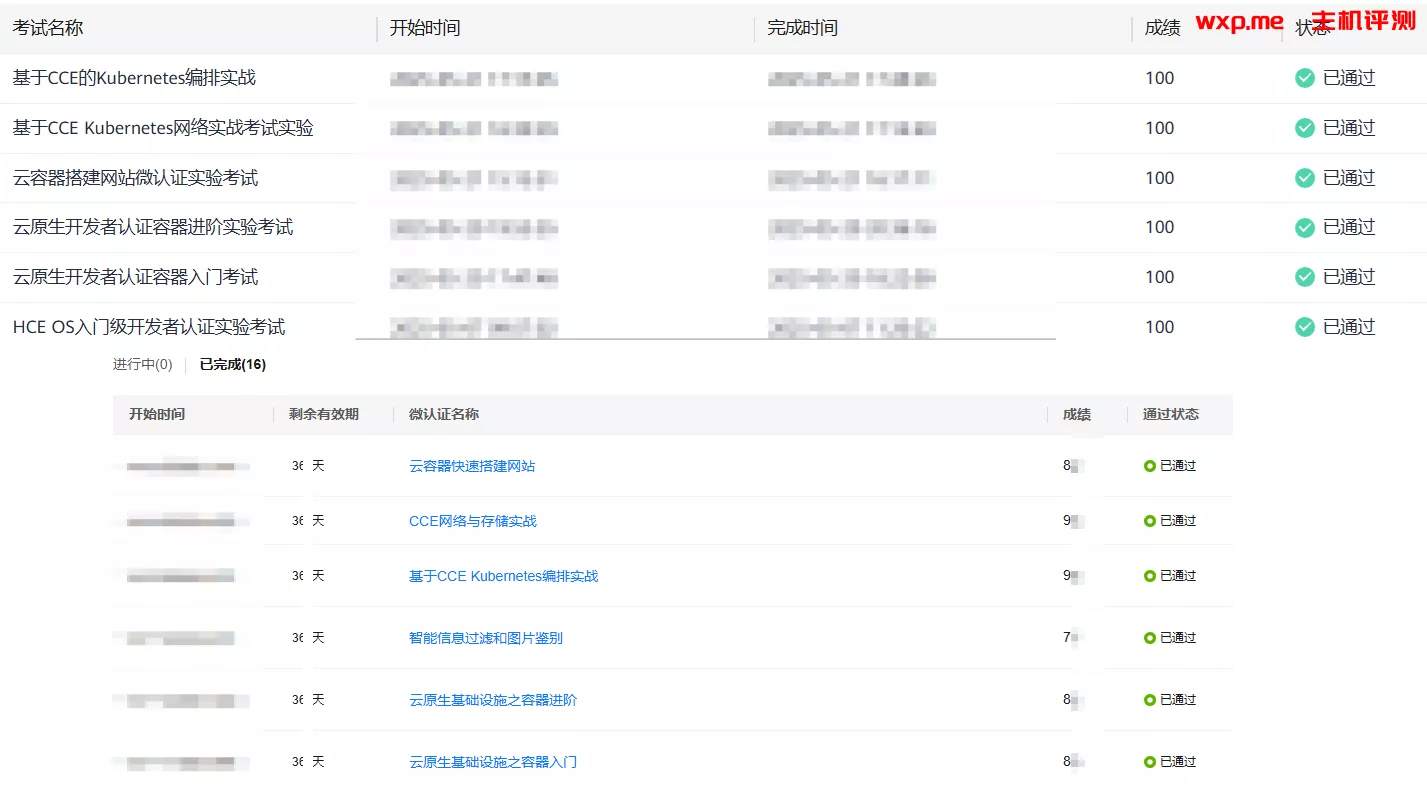
> 这次发考证券快多了,直接考完6个
>
> 理论考试偏技术性问题,直接全部问`gemini 2.5pro`能一遍过,因此就不放理论考试题目了
>
> 开虚拟机或者远程桌面或者scrcpy连接手机防切屏检测,推荐搭配chrome插件:[超级复制](https://chromewebstore.google.com/detail/supercopy-%E8%B6%85%E7%BA%A7%E5%A4%8D%E5%88%B6/onepmapfbjohnegdmfhndpefjkppbjkm),直接就能复制,省的ocr题目
>
> `实验考试`操作就是`docker` `kubectl` 那些命令,不会也能问gemini,下面放了题目,如果有不懂的直接扔给ai让生成命令就行
> 前5个认证都有实验考试,不过实验考试证书不会生成,38的微认证应该都没有实验考试
> **有些槽点**:
>
> 1. 实验考试的云服务器默认安全组没开22端口,要先去安全组放行,建议直接`一键放通常用端口`,省事
>
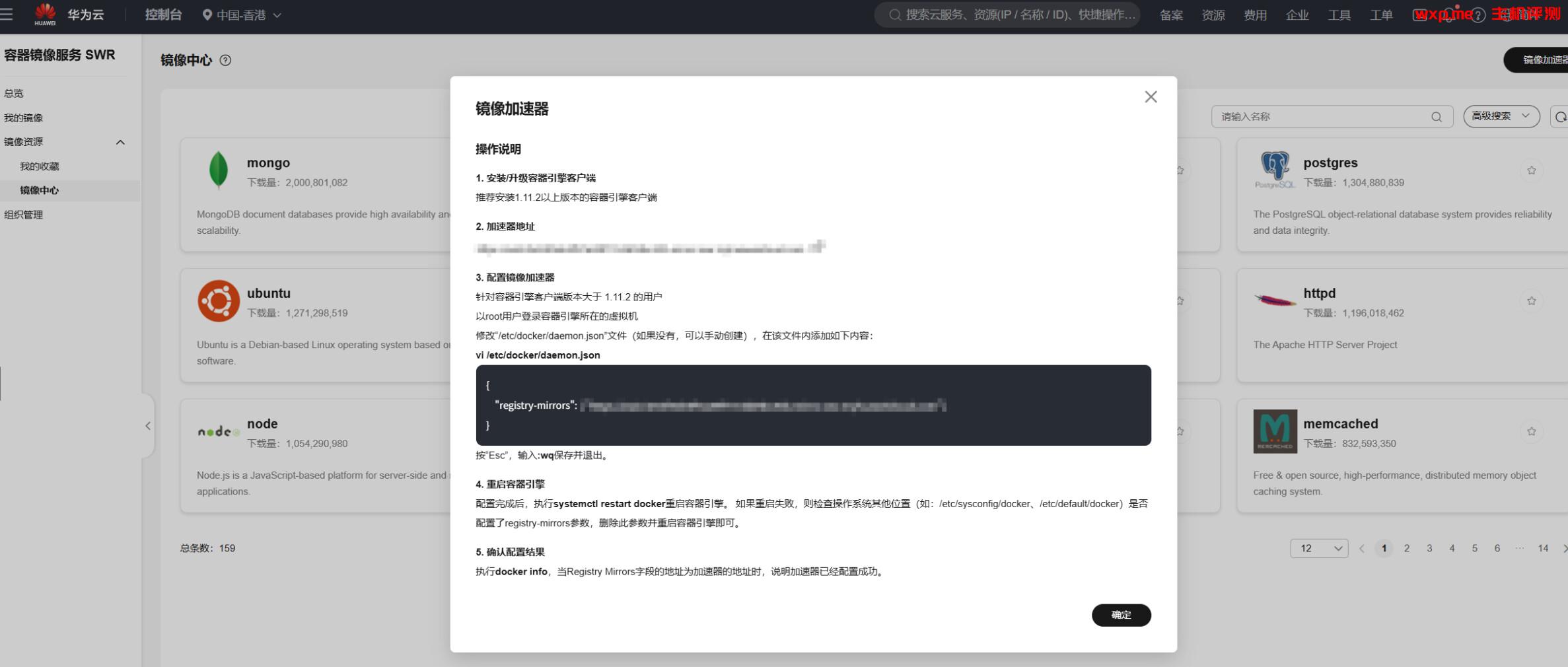
> 2. 容器拉不下来,要配置镜像地址
> `华为云控制台`-`容器镜像服务 SWR`-`镜像资源`-`镜像中心`-`镜像加速器` 可直接复制命令配置华为源
> 
>
> 但是华为源有的镜像还没有,我用的`1panel`的镜像源:
>
> ```bash
> sudo vim /etc/docker/daemon.json
> ```
>
> ```json
> {
> "registry-mirrors": ["https://docker.1panel.live"]
> }
> ```
>
> ```bash
> sudo systemctl daemon-reload
> sudo systemctl restart docker
> docker info
> ```
>
> 3. `kubectl`配置文件可以这样上传:
>
> ```bash
> user@sandbox:~/Downloads$ ls
> cce-k8s-kubeconfig.yaml
> user@sandbox:~/Downloads$ realpath cce-k8s-kubeconfig.yaml
> /home/Downloads/cce-k8s-kubeconfig.yaml
> user@sandbox:~/Downloads$ scp /home/Downloads/cce-k8s-kubeconfig.yaml
[email protected]:/home
> ```
>
> 4. 云数据库RDS安全组也没放开,记得放端口,还有绑定弹性IP
> 5. 不知道官方故意还是写错了,写的镜像niginx:1.7.9,不过不影响考试步骤,就按niginx:1.7.9来吧
>
> 附实验考试题目和AI答案(人工进行了订正,如有错误请再问AI详细的命令):
>
> ```
> 云原生基础设施之容器入门
> ```
>
> ------
>
>
> 任务1:dockerfile构建容器镜像
>
> 得分点:能正确创建名为httpd:v1的镜像,并正常运行。
>
> 其中dockerfile的部分参数如下:
>
> ```
> ① 基础镜像:httpd
>
> ② 维护者:
[email protected]
>
> ③ 端口:80
>
> ④ 运行命令:echo "dockerfile test"> /usr/local/apache2/htdocs/index.html
> ```
>
> ⑤ 以下为dockerfile模板,可根据此模板修改内容:
>
> ```dockerfile
> FROM centos:centos7
>
> MAINTAINER
[email protected]
>
> EXPOSE 80
>
> RUN yum install -y httpd vi && yum clean all
> ```
>
> 使用docker run以该镜像运行容器,并借助-p参数指定访问端口为80。在浏览器内输入http://EIP:80。出现`dockerdile test`文字则证明任务完成。
>
> 本任务中需注意以下内容:
>
> (1)使用错误的命名不得分
>
> (2)多或者少开放端口不得分